VIGILWEB · SMS OPT-IN
Vigilweb SMS Opt-In
Vigilweb is an Android app. SMS alerts are optional and are configured entirely inside the app. There is no web sign-up form, purchased number list, or imported contact list.
How users opt in
- Open Alert settings → SMS & email → Set up SMS.
- Enter the mobile number that should receive alerts.
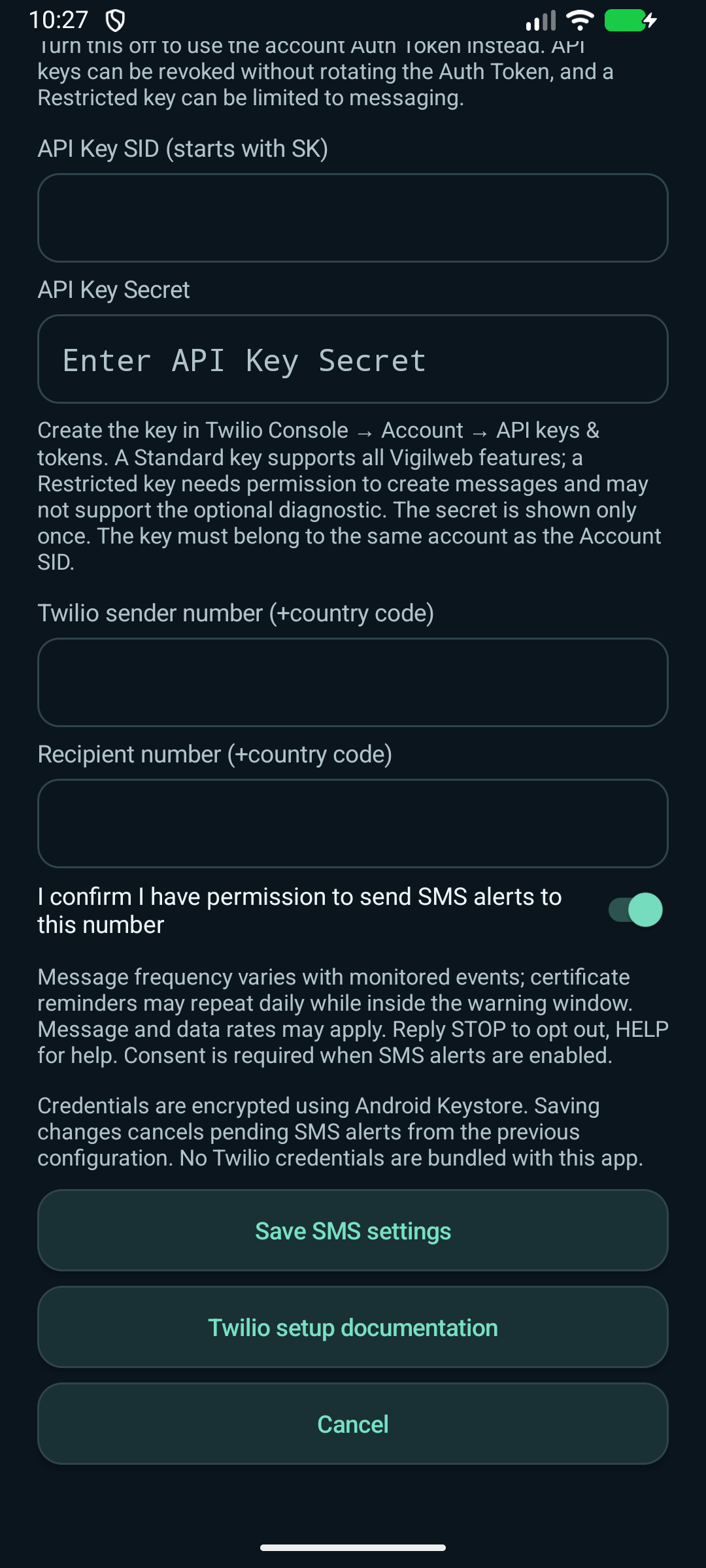
- Switch on "I confirm I have permission to send SMS alerts to this number."
- Enable SMS alerts and save the settings.
The app sends only transactional website-monitoring alerts (outages, recoveries, and TLS certificate expiry) to the single user-configured number. No marketing messages are sent.
Message frequency varies with monitoring events, and certificate reminders may repeat daily while a certificate is inside its warning window. Message and data rates may apply. Reply STOP to opt out, HELP for help. Users can also disable SMS alerts in the app.
Consent screen
The SMS setup screen requires the recipient consent confirmation before alerts can be enabled. It also displays the message-frequency, rate, and STOP/HELP disclosure.
Policies
Privacy Policy · Terms & Conditions
For questions, contact support@piemobileapps.com.